
Build your school timetable without teacher clashes
One school membership. Timetable + CoverDesk + seven planning packs.
Put your timetable team back in control
Less manual rearranging. Import school data, compare three alternatives and repair detected clashes.
Ready for the staff room. Produce clear class and teacher copies with your school name and logo.
Useful beyond the first timetable. Arrange teacher cover, revise schedules and keep backups throughout your membership.
Inspect a real exported timetable ↗ · Ask a setup question
Your school can get started in three steps
- 1. Create your school accountRegister and choose your membership.
- 2. Pay with M-PesaApprove the payment prompt on your phone.
- 3. Open your school toolsAfter payment confirmation, use Timetable, CoverDesk and your downloads.
Term membership
KSh 699140 days of accessTimetable, CoverDesk and all seven planning packs included.
Join for 140 days →Annual membership
KSh 1,399One year of accessSame complete membership, with year-round access.
Join for one year →ALSO AVAILABLE: OFFLINE WINDOWS SOFTWARE
KTT Desktop — Timetable + CoverDesk. Pay once.
Prepare school timetables on your Windows computer, check clashes and organise teacher cover, including when your internet connection is unreliable.
KSh 4,999 one-time licence
Perpetual desktop access for one Windows installation. Online memberships are separate.
Free Microsoft Store download; full access requires a paid licence. Buy and activate your desktop licence →
Everything included in both plans — view checklist
- Automatic timetable generation
- Teacher, class and room clash checks
- Three timetable alternatives
- All 12 timetable views and wall posters
- Teacher allocations and workload planning
- School days, periods and break-time setup
- Excel import for school data
- Editable Word and Excel exports
- Print-ready PDF and CSV exports
- School name and logo on exports
- CoverDesk teacher absence cover
- Daily cover sheets and duty rosters
- Exam and invigilation planning
- Cloud backups and revision history
- Seven editable school planning packs
Full amount paid by M-Pesa. Access activates after payment confirmation.
Annual saving compared with three KSh 699 term memberships.
A timetable your school can be proud to share
Clear lesson times, colour-coded subjects and a separate schedule for every class and teacher. Add your school name and logo, then download editable Word files or print / save as PDF.
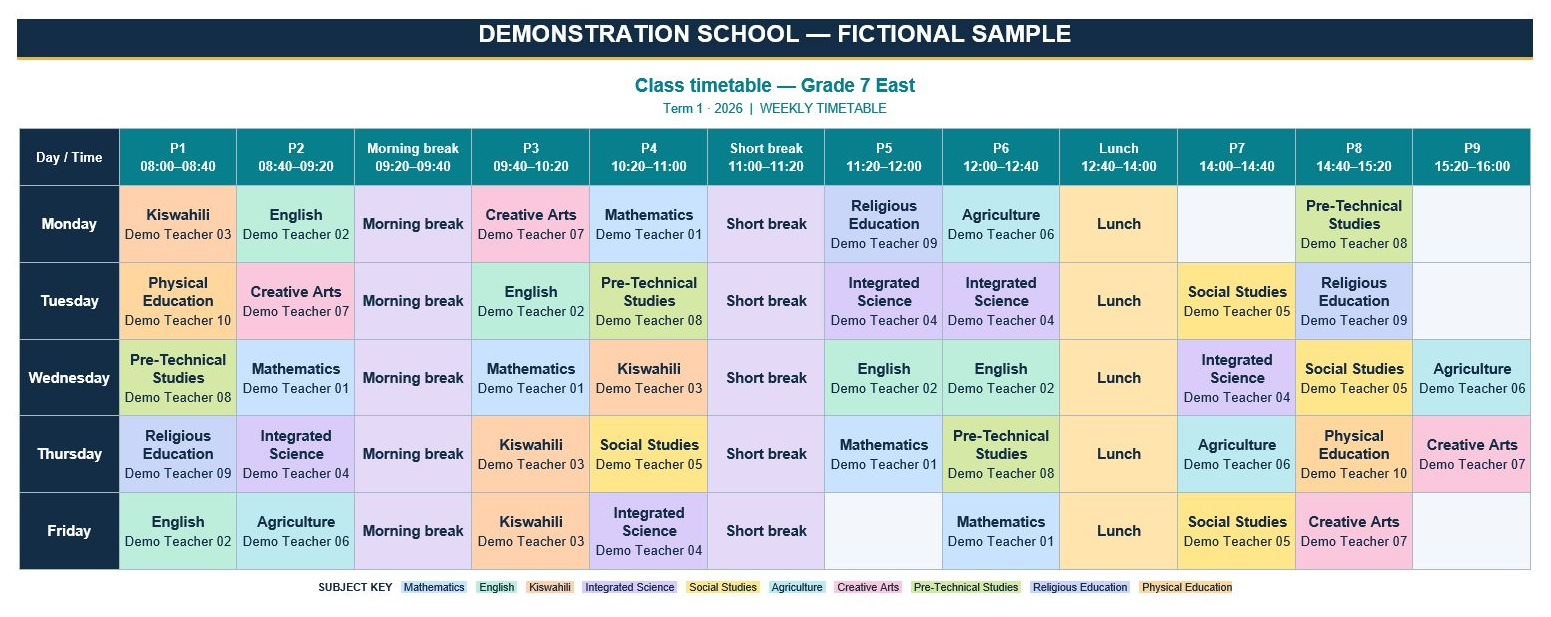
One membership for planning lessons and managing the school day
Give your timetable team the tools to prepare schedules, handle changes and produce clear copies for staff. Both Term and Annual memberships include the benefits below.
Spend less time arranging lessons
Import school data from Excel and generate timetable alternatives. Compare options instead of arranging every lesson manually.
Find clashes before sharing timetables
Check teacher, class and room conflicts. Review warnings and use repair tools to resolve problems before approving the schedule.
Give every teacher a clear schedule
Create class, teacher, room and subject timetables, summaries and wall posters. All 12 timetable views come from the same school data.
Handle teacher absences with CoverDesk
Identify available teachers, arrange cover, prepare duty rosters and print daily cover sheets. CoverDesk is included in your membership.
Keep work ready for the next change
Save to your school workspace, keep cloud backups and review recent revisions. Update allocations when teachers, subjects or rooms change.
Download documents your school can use
Export editable Word and Excel files, PDF and CSV outputs. Get seven included planning packs for term calendars, exams, workload and school planning.
Choose how long your school needs access
KSh 699 for 140 days or KSh 1,399 for one year. Both include Timetable, CoverDesk and seven planning packs. The access period is the difference.
Explore the demo first. When ready, create your school account, choose a membership and pay with M-Pesa. Membership access activates after payment confirmation.
One school membership that helps beyond the first timetable
Choose us if your school wants a practical way to plan lessons, check conflicts, produce clear schedules and organise teacher cover throughout the membership period.
Built around Kenyan school needs
Plan classes, streams, subjects, teachers and shared rooms, with options for Kenyan school types and CBC/CBE planning. Pay locally with M-Pesa.
Check problems before they reach staff
Validation, conflict checks and repair tools help your timetable team identify issues before approving and distributing the schedule. Your school reviews the final result.
Use the same data for every timetable view
Create 12 class, teacher, room, subject and summary views from one set of school data. Export Word, Excel, PDF and CSV files for different school needs.
Keep managing the school day
CoverDesk is included for teacher absence cover, daily cover sheets and duty rosters. Your membership supports both weekly planning and day-to-day changes.
Know what you are paying for
KSh 699 for 140 days or KSh 1,399 for one year. Both combined memberships include Timetable, CoverDesk and seven editable planning packs, with one shared expiry date.
Explore before you commit
Try the interactive timetable demo without registering. Review the actual workspace, follow the Help Centre and contact support about your school’s requirements before choosing a plan.
See whether it fits your school
Try a small example, review the outputs, then choose the membership period you need. Your timetable team stays in control of lesson allocations, final approval and cover assignments.
See the timetable. Understand teacher cover. Inspect the outputs.
Try a ready-made school example and see how the tools fit your school’s daily work.
1. Follow the CoverDesk walkthrough
A teacher is away. Load the working demo, record the absence, create the cover list and review suggested replacements. Then prepare a daily sheet for staff.
You stay in control: check availability and teaching suitability before approving cover.
See CoverDesk step by step →2. Inspect the timetable outputs
Open the ready-made demo with no typing or registration. Switch between individual class and teacher timetables, then try Word, Excel, CSV or print/PDF.
Download the school-branded sample pack (ZIP)
Try the ready-made demo →3. See a complete worked example
Fictional demonstration school: 4 classes, 10 teachers and 160 weekly lessons. In our demo check, all requested lessons were placed and separate schedules opened for every class and teacher.
This is a product demonstration, not a customer testimonial. Compare the outputs with your school’s requirements before joining.
Explore the sample school →Timetable + CoverDesk + seven editable planning packs
KSh 699 for 140 days or KSh 1,399 for one year.
Compare memberships · Join your school
What is CoverDesk, and why does your school need it?
Your timetable plans a normal school week. CoverDesk helps you organise the day when a teacher is absent.
See which lessons need cover
When a teacher is away, use the teacher’s timetable to identify the affected lessons so the school can plan who will take them.
Find an available teacher
Identify teachers with a free period and review workloads when arranging cover. The school chooses the suitable teacher for each lesson.
Give staff a clear daily plan
Prepare daily cover sheets and duty rosters so staff can see who is assigned, where they should go and which lesson needs attention.
For example: a teacher is away on Tuesday
The deputy principal needs to arrange cover for the affected classes. CoverDesk helps identify available teachers and prepare a daily cover sheet, reducing the need to search through separate timetables and handwritten notes.
Plan the week with Timetable. Manage changes with CoverDesk.
Both tools are included in the same school membership: KSh 699 for 140 days or KSh 1,399 for one year. No separate CoverDesk membership is needed.
Watch the workflow. Inspect the downloads.
Review actual application screens and fictional school examples before choosing your membership.
Start with a 40-second introduction
Pause or open full screen to inspect the controls. Explore the interactive demo when ready.
Watch the complete feature tour — 4:50
Inspect sample Word, Excel and PDF files
See how class and teacher timetables look before purchasing. These examples use fictional school data and are not customer endorsements.
Extract the ZIP to inspect the files. Samples illustrate outputs; your school should review its own lesson requirements and final timetable.
Choose with confidence
Try the demo, inspect the files and read our refund policy. For questions about suitability, setup or activation, contact timetable support.
Built for the daily work of a Kenyan school
See the actual workspace below, then try the interactive demo with fictional school data. No registration is needed to explore the demo.
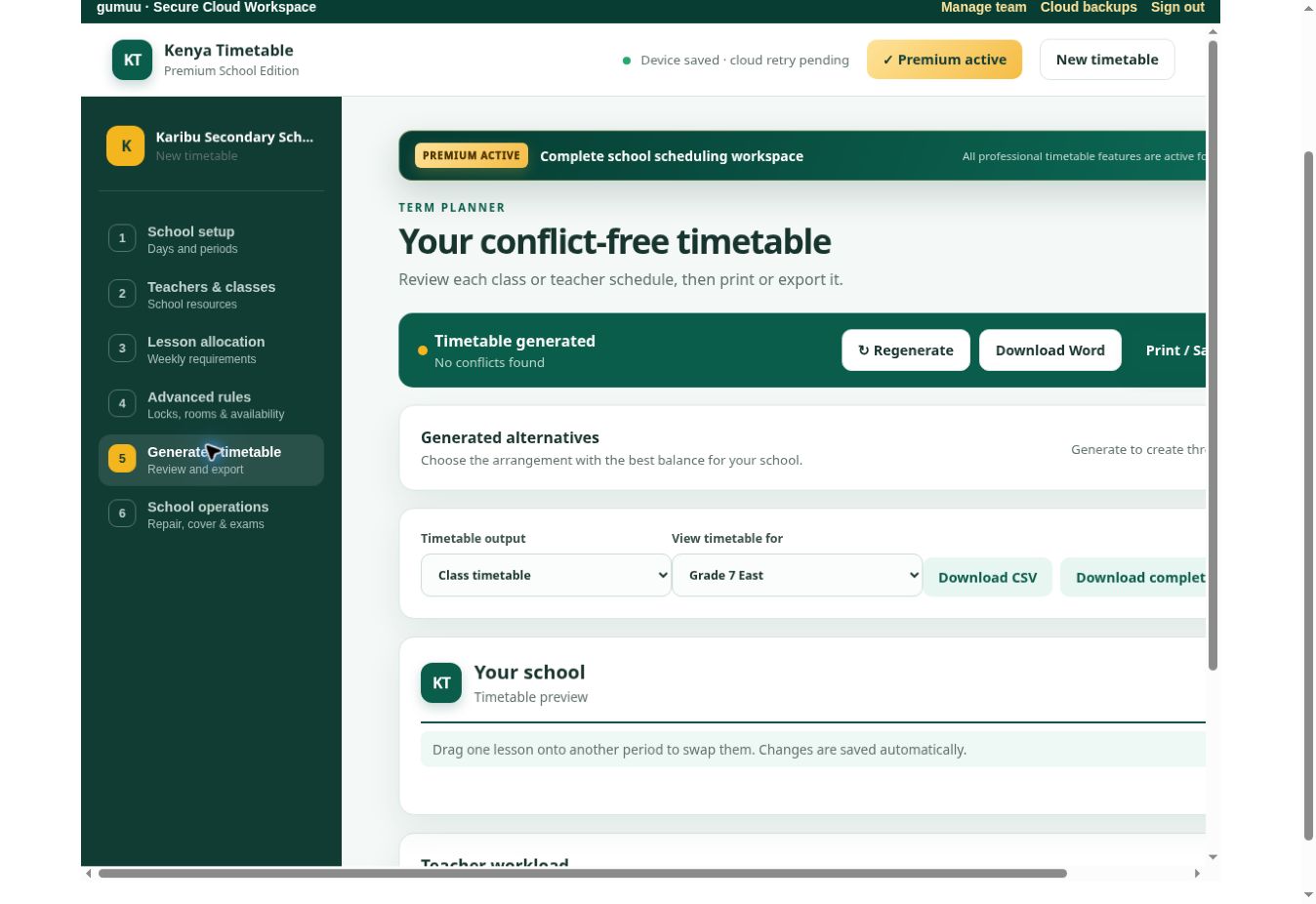
Conflict-free generation and exports
Review class, teacher, room and subject schedules; compare alternatives; check workload; then download Word, Excel, PDF or CSV.
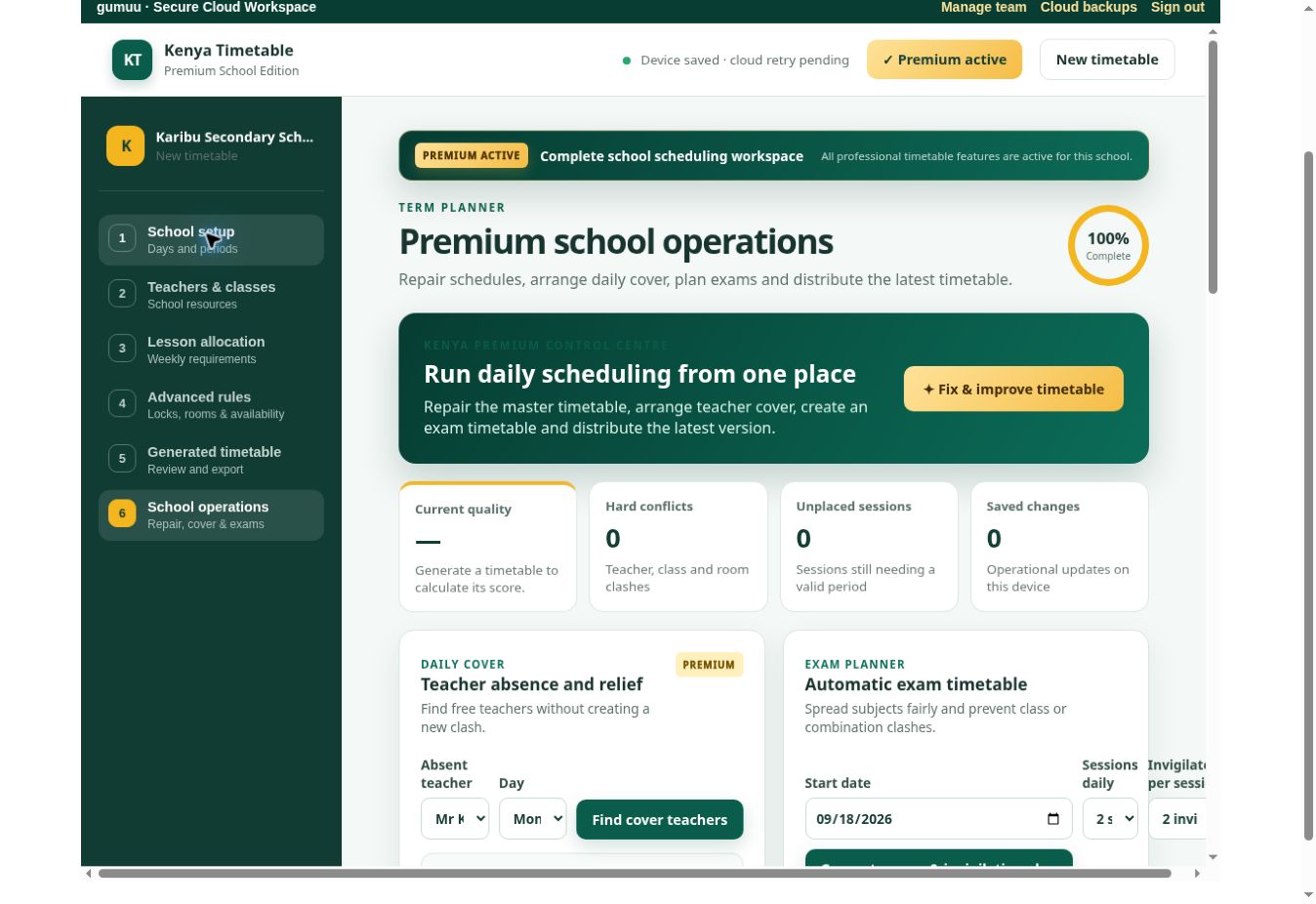
Guided school setup
Set the school name, academic year, term, lesson times, teaching days and periods through a clear step-by-step workspace.
The features behind your school’s benefits
Premium is more than automatic generation. It gives your school the tools to solve conflicts, coordinate staff, manage exams and keep every timetable version safe.
Smart automatic generation
Create balanced timetable alternatives while respecting teacher, class, subject and room constraints.
Automatic repair & validation
Detect missing data, clashes and workload problems, then repair conflicts before publishing.
Clash-safe editing
Adjust lessons with drag-and-drop controls while the system protects against new conflicts.
Teacher cover & workload
Find suitable daily cover teachers and review teaching loads for fairness across the staff.
Exam & invigilation planner
Build exam timetables and assign balanced invigilation duties without teacher or room clashes.
Approval & certificate
Record formal approval of the final timetable and generate a clear approval certificate.
Rooms, labs & campuses
Optimize room use, protect specialist facilities and check travel time between campuses.
Backups & revision history
Keep cloud backups, restore earlier versions and review the timetable change log.
Secure staff access
Create staff accounts and share portable timetable views through the school portal or WhatsApp.
Professional exports
Download editable Excel and Word files, print-ready PDFs, CSV data and school wall posters.
Three timetable alternatives
Compare independently generated options, quality scores and the recommended best result.
Fast Excel setup
Use the downloadable template to bulk import teachers, classes, subjects, rooms and allocations.
12 timetable views from one set of school data
Print, download or share the exact view needed by administrators, teachers, learners and departments.
One school membership. Both tools included.
One payment, one membership, one expiry date. Build your timetable and manage teacher cover, daily cover sheets and duty rosters with the same school membership.
One School Term
Both Timetable and CoverDesk for 140 days.
- Full premium timetable planning and all 12 views
- Branded Word, Excel and print/PDF exports
- Teacher cover, daily cover sheets and duty rosters
Annual School
Both Timetable and CoverDesk for one year.
- Everything in the term membership
- Continuous timetable and daily cover planning
- Save KSh 698 compared with three term payments
Pay securely by M-Pesa Express. Access activates after payment confirmation. All seven editable planning packs are included free with either membership. Open My KTT Downloads after signing in.
How M-Pesa Express works
Create your school account
Register securely, enter your school details and open the timetable workspace.
Select a Premium plan
Choose a 140-day term or annual Timetable + CoverDesk membership and enter your M-Pesa number.
Confirm on your phone
Approve the Safaricom STK Push. Premium activates automatically after confirmation.
Frequently asked questions
Can I try it before buying?
Yes. Open the interactive demo without registering. Use fictional data to explore setup, generation and timetable views. Demo work stays on this device; your school account provides the separate signed-in workspace and online backups.
What does my membership include?
Both plans include Timetable and CoverDesk, all 12 timetable views and seven editable planning packs. Choose KSh 699 for 140 days or KSh 1,399 for one year. The difference is the access period.
What happens after I pay?
Access activates when Safaricom confirms your M-Pesa payment. Sign in with the school account used for checkout, open your timetable workspace and visit My KTT Downloads for included packs. If activation is delayed, keep your M-Pesa confirmation and contact support.
Where can I get setup help?
Follow the Help Centre for registration, Excel import, validation and exports. For a question about your school setup or payment, contact timetable support.
Can it generate separate timetables for classes and teachers?
Yes. It generates individual class, teacher, classroom and subject timetables, plus summaries, lesson grids and wall posters.
Does it prevent timetable clashes?
Yes. Generation, validation and editing check teacher, class and room conflicts. Premium repair tools help resolve detected problems.
Can we prepare exam timetables?
Yes. Premium includes exam scheduling and balanced invigilation assignment with clash checks.
Can we import our existing school data?
Yes. Download the Excel setup template and import teachers, classes, subjects, rooms and allocations in bulk.
Which files can we download?
You can export professional Excel, editable Word, print-ready PDF and CSV files.
How does Premium payment work?
Select a plan and approve the M-Pesa Express prompt on your phone. Access activates after Safaricom confirms the payment.
Build your school timetable with confidence
Start with your school data, generate the best option and publish a schedule your staff can trust.
Questions before you choose?
Review the demo and setup guidance, or contact support about your school’s requirements.
Free planning downloads for membership buyers
All seven editable packs below are included with either Timetable + CoverDesk membership. No separate pack payment is needed.
School Timetable Starter Pack
Included at no extra cost
- School setup, period plan and editable weekly grid
- Class, stream, subject and lesson-allocation sheets
- Runs on your computer: no teacher or timetable data is sent to KTT
School Timetable Print Pack
Included at no extra cost
- A4 class, teacher and classroom timetable layouts
- Bell-time poster ready to edit and print
- Designed for clear staff-room and noticeboard copies
Exam Timetable + Invigilation Pack
Included at no extra cost
- Exam timetable, room seating and invigilation roster
- Candidate examination notice template
- Editable sheets for internal, mock and end-term examinations
Teacher Workload & Lesson Allocation Report
Included at no extra cost
- Teacher lesson allocation and workload summary
- Overload, balance and free-lesson planning sheets
- Useful for deputy principals and heads of department
New-Term Timetable Change Pack
Included at no extra cost
- Change register, cover-lesson planner and handover checklist
- Record staff, class, subject and room changes clearly
- Keep your school timetable information inside your own office
School Calendar & Events Planner
Included at no extra cost
- Term calendar, key dates and events planner
- Meetings, visiting-day and duty planning sheets
- Editable school calendar for printing or sharing internally
CBC/CBE Junior School Subject Allocation Pack
Included at no extra cost
- Grades 7–9 weekly learning-area allocation sheet
- Practical, laboratory, workshop, clubs and games planner
- Editable Kenya Junior School planning workbook
After membership payment, sign in to your school account and open My KTT Downloads. Download and extract each ZIP, then edit the templates on your computer. These are optional companions to the timetable and CoverDesk tools.