
KTT FOR WINDOWS • TIMETABLE + COVERDESK
Build your school timetable offline. Pay once.
Plan lessons, check clashes and organise teacher cover in one Windows app. Give your timetable team a practical way to prepare schedules and manage changes.
One payment • perpetual desktop licence
Timetable + CoverDesk included
For one Windows installation
Get your desktop licence ↓Download from Microsoft Store ↗
The Store download is free. Full desktop access requires a paid licence.
Get your KTT desktop licence
KSh 4,999 once for a perpetual licence on one Windows installation. Enter your school details below to receive an M-Pesa payment prompt.
Timetable + CoverDesk: plan lessons, prevent clashes and organise teacher cover. One Windows installation. Free Store download. No login needed. KTT will reply by email. This enquiry does not request payment. Timetable + CoverDesk includes import of the prepared KTT Excel workbook. In the desktop app, open Teachers & classes, download the template, fill it in and import it. The workbook contains Teachers, Classes, Subjects, Rooms and Allocations; arbitrary spreadsheet layouts need to be transferred into this template. Each allocation specifies the class, subject and responsible teacher. You choose sessions per week and periods per session, including separate rows for mixed singles and doubles. Sessions are meetings; periods are teaching slots. Weekly periods = sessions × length. Length 1 means single, 2 means double and 3 means triple. For example, 5 sessions with Length 2 uses 10 periods, not 5. KTT does not decide that Maths or Science must have doubles from the subject name. Enter your school-approved weekly requirements. A double uses two consecutive teaching periods and cannot cross a break. Select a laboratory or other special room when required; KTT checks class, teacher and room constraints during scheduling. Maths: 3 singles + 1 double = 5 periods/week. Science: 2 singles + 1 double = 4 periods/week. Use separate rows for singles and doubles for the same teacher, subject and class. These planning features are included in the KSh 4,999 one-off desktop licence. Downloading the app is free; activate saving and exports with the 16-character code delivered after verified Paybill payment.KTT Desktop licence
Buy your licence
Ask about a licence by email
Before you buy: Excel import, teacher allocations and double lessons
Class Subject Teacher Sessions/week Length Periods/week Grade 9 East Mathematics Ms Demo 3 1 (single) 3 Grade 9 East Mathematics Ms Demo 1 2 (double) 2 Grade 9 East Science Mr Example 2 1 (single) 2 Grade 9 East Science Mr Example 1 2 (double) 2
One desktop licence. Two everyday school tools.
Timetable
Plan lessons, review schedules and check clashes before your school approves the final timetable.
CoverDesk
Organise teacher cover so changes to the normal school day have a clear plan.
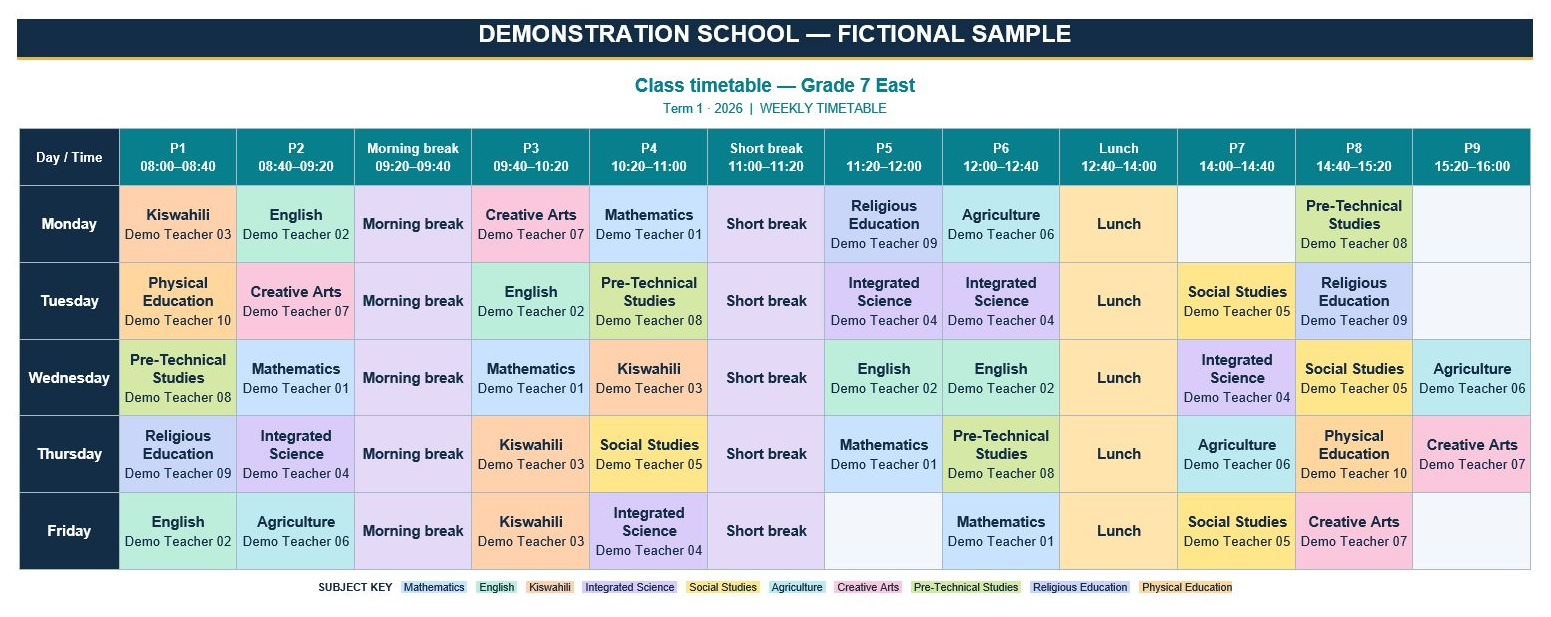
See the kind of output your school can share
Inspect this KTT timetable example for layout and readability. It uses fictional school data; check the Windows app for the desktop features and outputs you need.
From download to activation
- Download KTT for Windows. Install it from Microsoft Store.
- Buy your desktop licence. Enter your school name, licence email and paying M-Pesa number below. Approve the payment prompt on your phone.
- Activate your installation. After payment verification, your 16-character licence code is emailed to you. Paste it into KTT Desktop → Activate.
Questions before you buy?
Is the free Store download the full paid licence?
No. Downloading the app is free; the perpetual Timetable + CoverDesk desktop licence costs KSh 4,999 for one Windows installation.
How do I receive my licence?
After payment verification, we email your 16-character licence code. Enter it in KTT Desktop → Activate. Check your email address carefully before requesting payment.
What if I replace my computer or need help with updates?
The licence is for one Windows installation. Contact support before buying if you need clarification about replacement computers, reactivation, updates or your school’s setup.
Contact KTT support · Read the refund policy · Terms and conditions